
Free One-Page Brand Guidelines Template (Brand Board)
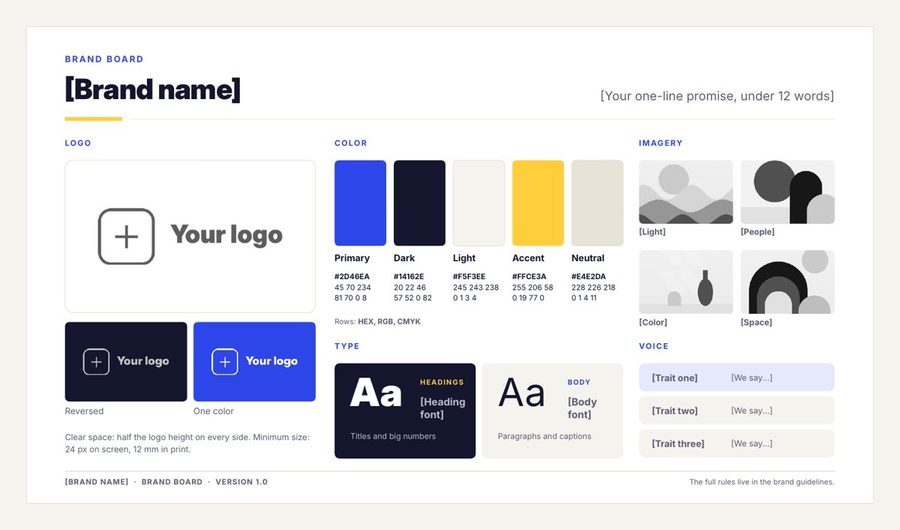
Your logo, colors, fonts, imagery and voice on a single page that anyone can follow. Editable in PowerPoint, Google Slides and Keynote, with a PDF to look at first. No sign-up.
- No sign-up. The download starts straight away.
- Free for your own brand or a client's. Please don't resell or re-share the file.
Want the full set? The Brand Guidelines Template is $13.30.
Get the Brand Guidelines Template30% off with code LAUNCH30, already applied when you click Buy.
What's in the free download
- A one-page brand board in 16:9 (PowerPoint) and as a PDF
- Logo in three versions: main, reversed on dark and one color
- Color palette with spaces for HEX, RGB and CMYK codes
- Heading and body fonts, imagery examples and three voice words
- Colors and fonts set in the theme, so you change them in one step
How to fill in your brand board
- Open Brand-Board.pptx in PowerPoint or Keynote, or import it into Google Slides with File > Import slides.
- Type your brand name and a one-line promise of 12 words or fewer.
- Add your logo: right-click each logo box and choose Change Picture. Use your main logo, a version for dark backgrounds and a one-color version.
- Set your colors in one step: Design > Variants > Colors > Customize Colors. Accent 1 is your main color and Accent 2 your accent. Then type each color's HEX, RGB and CMYK codes under its swatch.
- Set your fonts with Design > Variants > Fonts, and type the font names on the board.
- Swap the imagery examples for photos that show your style, and write three words for how your brand sounds.
- Export a PDF and share it with anyone who designs, writes or prints for you.
What a one-page brand guide should cover
| Section | Why it matters |
|---|---|
| Logo versions | The right logo for light, dark and one-color uses |
| Colors with codes | HEX for screens, RGB for digital tools and CMYK for print, so colors match everywhere |
| Fonts | One heading font and one body font keep everything consistent |
| Imagery | Shows the look of photos and illustrations to use |
| Voice | Three words that guide how your brand writes |
When you need more than one page
A brand board is enough for a small business starting out. Once other people make things for your brand, a full guide helps: clear space and logo don'ts, color proportions, a type scale, layout rules and examples in use.
The full Brand Guidelines Template has a 32-slide brand guide with prompts on every slide, the same guide filled in for a sample coffee brand so you can see a finished one, and a Word version.
HEX, RGB and CMYK: which code is for what
| Code | Example | Use it for |
|---|---|---|
| HEX | #2D46EA | Websites, social posts and most design apps |
| RGB | 45, 70, 234 | Screens, slides and video |
| CMYK | 81, 70, 0, 8 | Anything printed: cards, flyers, packaging |
Colors on paper never match a screen exactly, so print a test before a big order and adjust the CMYK values if needed. Write the final codes on your brand board so every designer and printer uses the same ones.
How to choose your brand basics quickly
- One main color that people will remember you by, plus one accent color for buttons and highlights.
- A dark color for text and a light color for backgrounds. Check the text is easy to read on the background.
- Two fonts: a heading font with character and a plain, easy-to-read body font.
- Three voice words, for example warm, direct, expert, plus what you are not: stiff, salesy or vague.
- Logo versions: the main logo, one for dark backgrounds and a one-color version for stamps and embroidery.
Who to share your brand board with
- Anyone who designs for you: freelancers, agencies, your web designer
- Printers and sign makers, with the CMYK codes
- Whoever writes your posts, emails or website, for the voice words
- Partners or stockists who show your logo
Questions
Is it free to use for a client? Yes, you can make a brand board for your own brand or a client's. Please don't resell or share the template file itself.
Which fonts does it use? Inter and Inter Display, free under the SIL Open Font License. Any font works if you don't have them.
Want the full set?
The Brand Guidelines Template: One clear rulebook for everyone who touches your brand: your story, voice, logo, colors, fonts and examples in use, in a 32-slide guide with a prompt on every slide, so you always know what to write. Then sum it all up on a one-page brand board. $13.30, instant download.
Get the Brand Guidelines Template