
Free Instagram Post Templates for Small Business
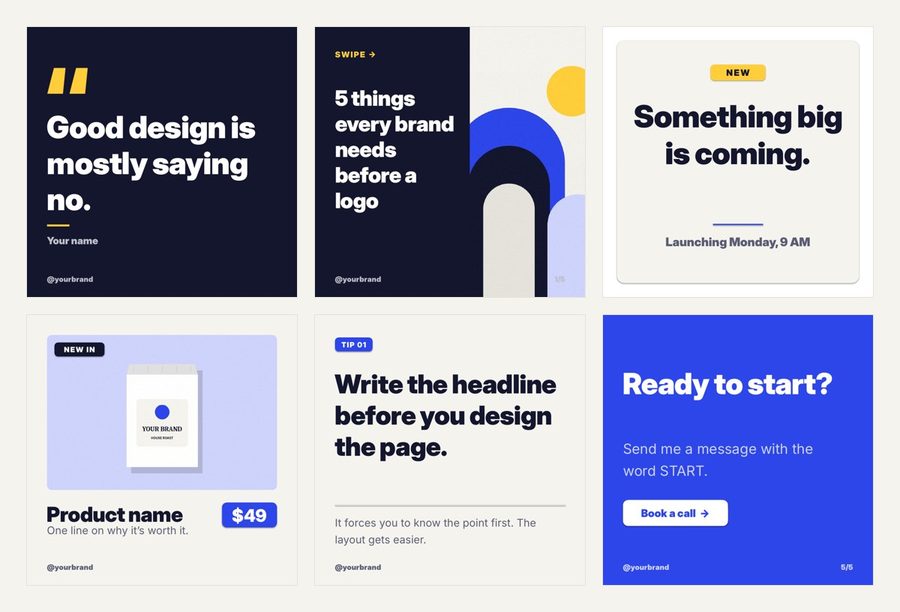
Eight editable square posts and six story highlight covers. Edit them in PowerPoint, Google Slides or Keynote, export, and post. No Canva account and no sign-up.
- No sign-up. The download starts straight away.
- Free for your own brand or business. Please don't resell or re-share the files.
Want the full set? The Instagram Post Templates is $8.40.
Get the Instagram Post Templates30% off with code LAUNCH30, already applied when you click Buy.
What's in the free download
- 8 square posts at 1080 x 1080: a quote, a tip, a carousel cover and first slide, a launch teaser, a new product post and two call-to-action posts
- 6 story highlight covers as PNG files
- Fonts and colors set in the theme, so you can switch them to your brand in one step
- A read-me with how to edit and export
How to edit and post the templates
- Unzip the download and open Instagram-Posts-1080x1080-Free.pptx in PowerPoint or Keynote. For Google Slides, open a blank deck and use File > Import slides.
- Click any text and type your own. Swap the sample product image with right-click > Change Picture.
- To use your brand colors everywhere at once, in PowerPoint go to Design > Variants > Colors > Customize Colors.
- Export: in PowerPoint, File > Export and choose PNG or JPEG. In Google Slides, File > Download > PNG image for the current slide.
- Send the images to your phone and post them, or upload them to your scheduler.
What to post with each template
| Template | Use it for |
|---|---|
| Quote | A line from a customer, or something you believe about your work |
| Tip | One useful tip your customers can use today |
| Carousel cover and slide | A short list or how-to, one point per slide |
| Launch teaser | A new product, service or date coming soon |
| New product | A product photo with its name and price |
| Call to action | Ending a carousel, or asking people to book or message you |
Tips for posts that get saved
- Write the headline first. If it doesn't make sense on its own, the design won't save it.
- Keep to one idea per post and one point per carousel slide.
- Use the same two colors and two fonts on every post so people know it's you before they read your name.
- Post a carousel once a week. Carousels are the posts people save and come back to.
Free templates or the full pack?
The full Instagram Template Pack has 30 posts in both square and 4:5 portrait sizes, 3 complete carousels, 10 stories and 96 highlight covers, plus a start-here guide.
Instagram sizes to know
| Format | Size in pixels | Shape |
|---|---|---|
| Square post | 1080 x 1080 | 1:1 |
| Portrait post | 1080 x 1350 | 4:5 |
| Story or Reel cover | 1080 x 1920 | 9:16 |
The free templates are square. Portrait posts take up more of the screen in the feed, which is why the full pack has every post in both sizes.
A simple weekly plan with these templates
- Monday: a tip. One useful thing your customers can do today.
- Wednesday: a carousel. A short how-to or list, one point per slide, ending on the call-to-action slide.
- Friday: something to buy or book. The new product or launch template, with one clear next step.
Three posts a week is enough to stay visible, and it's a pace a busy owner can keep. Write all three captions in one sitting, then drop the words into the templates.
Make the templates look like your brand
- Set your two brand colors once in the theme and every template changes with them.
- Pick one heading font and one body font, and use them on every post.
- Keep your handle in the same spot on every post so people recognize it at a glance.
- Use your own photos where the templates have picture boxes: real products and people beat stock photos.
Questions
Do I need Canva? No. The templates are PowerPoint files that also open in Google Slides and Keynote, which are free.
What size are the posts? 1080 x 1080 pixels, Instagram's square post size.
Can I use them for my business? Yes, for your own brand or business posts.
Want the full set?
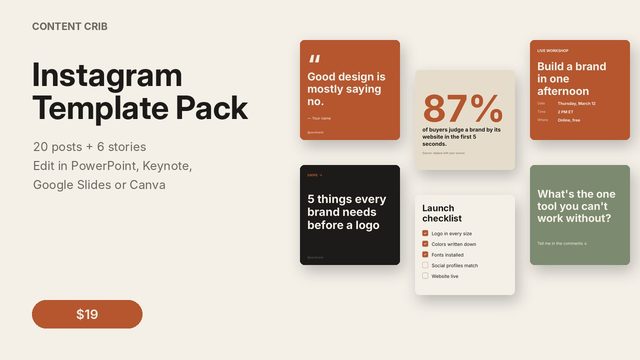
The Instagram Post Templates: A month of Instagram posts that look like one brand: 30 post layouts in both feed sizes, 3 carousels, 10 stories and 96 highlight covers, all in one clean, bold style. Change the words, add your photos and post. $8.40, instant download.
Get the Instagram Post Templates