
Free 2027 Budget Spreadsheet
Set a monthly budget for each category, log what comes in and goes out, and see what's left this month and across 2027. Works in Excel and Google Sheets. No email, no sign-up.
- No sign-up. The download starts straight away.
- Free for your own personal use. Not financial advice. Please don't resell or re-share the file.
Want the full set? The 2027 Money Spreadsheet Bundle is $20.30.
Get the 2027 Money Spreadsheet Bundle30% off with code LAUNCH30, already applied when you click Buy.
What's in the free download
- Categories: up to 40 income and spending categories, each with its own monthly budget
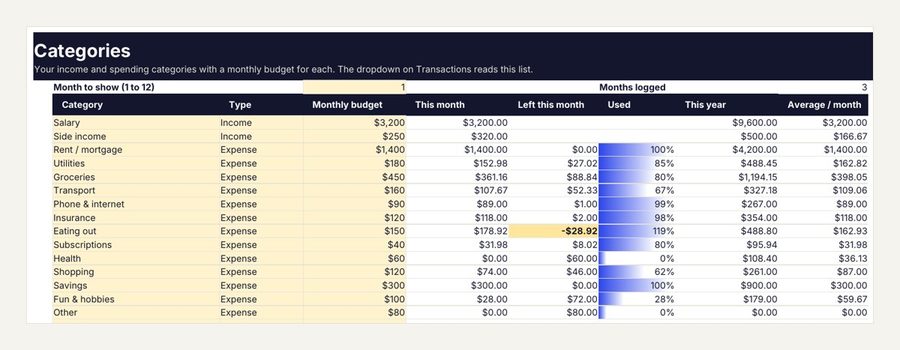
- This month, left this month and percent used for every category, with a bar that fills as you spend
- This year and average per month for each category, so you can see where 2027 is heading
- Transactions log for up to 1,000 rows with dropdowns for type and category
- Sample rows and a Start here tab with the steps
How to set up your 2027 budget
- Open the file in Excel, or upload it to Google Drive and choose Open with Google Sheets. In Excel, click Enable Editing so the formulas calculate.
- On Categories, rename the sample categories to match your life, mark each one Income or Expense and type a monthly budget for each.
- On Transactions, add a row for every paycheck, bill and purchase: date, description, amount, then pick the type and category.
- Back on Categories, type the month you want to look at in cell D3 (1 for January, 12 for December).
- Read across each row: what you've spent this month, what's left, and how much of the budget is used.
A starting budget, category by category
| Category | What goes in it |
|---|---|
| Rent or mortgage | Housing payment, plus HOA fees if you have them |
| Utilities | Power, water, gas and trash |
| Groceries | Food and household basics from the store |
| Transport | Fuel, transit, parking and car upkeep |
| Phone and internet | Mobile and home internet plans |
| Insurance | Health, car, renters or home insurance you pay monthly |
| Eating out | Restaurants, takeout and coffee |
| Subscriptions | Streaming, apps and memberships |
| Savings | What you move to savings each month, treated like a bill |
| Fun and hobbies | Everything you spend on enjoying life |
Start with your real numbers from last month's bank statement, not the numbers you wish were true. Adjust the budgets after a month or two of logging.
Three budgeting methods, and how to use them here
- 50/30/20: about half of take-home pay to needs, 30% to wants and 20% to savings and debt. Set your category budgets so the groups add up to those shares.
- Zero-based: give every dollar of income a job, so income minus all budgets equals zero. Add a Savings or Extra debt payment category for whatever is left.
- Pay yourself first: budget Savings as the first expense, then fit the rest into what remains.
A 10-minute weekly money check
- Log the week's transactions from your bank app.
- Look at the Used column: anything near 100% needs a slower week.
- Look at Left this month for the categories you still need, like groceries.
- Move money between categories if you have to, by changing the monthly budgets.
Free spreadsheet or the full 2027 Annual Budget?
| Feature | Free | 2027 Annual Budget (22 tabs) |
|---|---|---|
| Categories with monthly budgets | Yes | Yes |
| Transaction log with dropdowns | Yes | Yes |
| This month, left and percent used | Yes | Yes |
| Dashboard with 12 summary cards, a month picker and charts | No | Yes |
| 12 month tabs with planned against actual | No | Yes |
| Annual summary, sinking funds, bill calendar and net worth tabs | No | Yes |
The 22-tab 2027 Annual Budget comes in the 2027 Money Spreadsheet Bundle with five more spreadsheets: a debt payoff planner, a savings goals tracker, a net worth tracker, a subscription and bill tracker and a freelance money kit.
Questions
Is it really free? Yes. No email and no sign-up. The download is a ZIP with the .xlsx file and a short read-me.
Does it work in Google Sheets? Yes. Upload the .xlsx to Google Drive and open it with Google Sheets.
Can I use it for 2028? Yes. Save a copy, clear the transactions and change the dates. Keep one file per year.
Is it financial advice? No. It adds up your own numbers so you can see them clearly.
Want the full set?
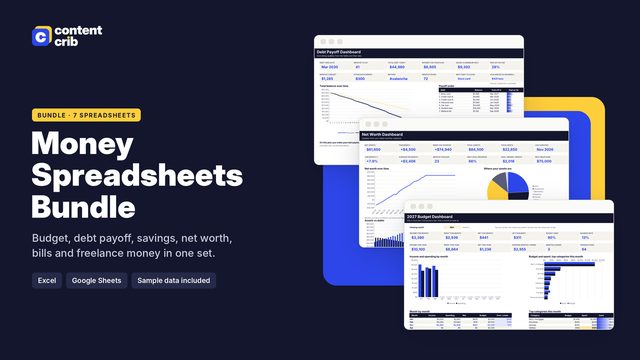
The 2027 Money Spreadsheet Bundle: Six money spreadsheets with the formulas already in place, led by a 22-tab 2027 annual budget: type your numbers and every total, chart and dashboard updates. $20.30, instant download.
Get the 2027 Money Spreadsheet Bundle